At some point, notifications stopped being a small detail in my Home Assistant setup. Every automation knew where its own message had to go. Some targeted my phone, some used a speaker, and several carried variations of the same delivery logic.
That worked while the number of automations was still manageable. Then the maintenance cost became hard to ignore. Why were my Echo speakers talking when nobody was home? Should a message arrive through push, speech, or both? And what would happen the next time I changed phones and had to replace the target in every relevant automation?
I eventually moved the delivery logic into one central script. The 28 automations connected to it now know the event and the information they want to send. They no longer need to know the concrete phone, speaker, or routing rule that will deliver it.
I have used this setup for several months. It is still imperfect, and the complete script below carries some historical baggage. Even so, it has become one of the best investments I have made in my smart home.
The repeated logic was the real problem
Before I introduced this abstraction, each automation handled its own notification. The same questions appeared again and again: Should this be a push message? Should a speaker announce it? Should both happen? Is anybody home to hear it?
The more automations I added, the more often I duplicated those answers. A change to a target device meant finding every place that knew about it. Replacing a smartphone was the clearest example: the notification target had changed, but the underlying events had not. Editing all of those automations would have been maintenance work created entirely by the architecture.
My software-development instinct was to separate two responsibilities:
- An automation knows what happened, how relevant it is, and what information should be communicated.
- A central script knows the available delivery channels, concrete target devices, and the household context that decides whether a message should be delivered now.
This was not about sending less useful information by definition. It was about deciding in one place how useful information reaches the right person.
My most important lesson: normal operation should be quiet
While consolidating the logic, I noticed a second problem: a smart home can become far too talkative.
Not every event deserves a message. Normal states usually do not need an active notification. Deviations and genuine action requirements matter more. If the system reports too much, I become used to the noise and pay less attention when a message is actually important.
That changed the question I ask when building an automation. I no longer start with how should I send this? I start with do I need to receive this at all? Some status information is still helpful to me, such as the washing machine finishing. Plenty of other events do not justify an interruption.
My VELUX KLF-200 self-healing automation is a good example of how that judgement keeps evolving. During the first phase, I wanted to know when recovery started and when it succeeded. That helped me observe the new automation. Over time, however, even a successful self-healing run can become unnecessary noise. I am considering keeping only the failure notification, because the entire point of automation is that I do not have to think about a successful repair attempt.
For me, fewer notifications mean fewer interruptions and more attention for the messages that remain.
One script, two responsibilities
The individual automation still performs its actual job. At the appropriate point, it calls the notification script and passes a set of parameters. The automation decides the message, its priority, and whether speech or push should be considered. The script then evaluates the current context and owns the final delivery decision.
The conceptual path is:
Relevance -> urgency -> context -> channel -> destination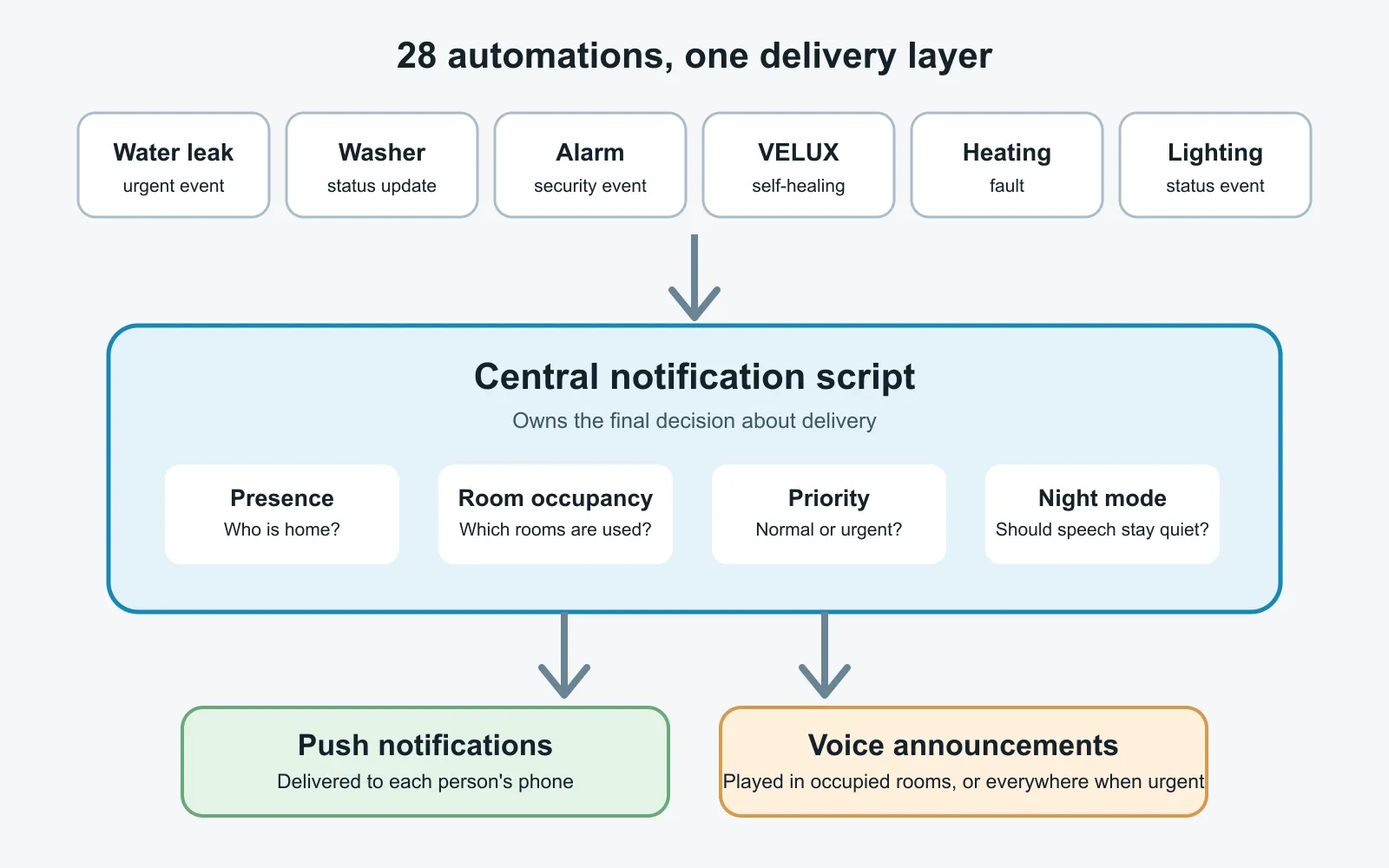
In the current version, the calling automation still chooses more than pure relevance. A later version could let the script derive the channel itself and reduce the number of parameters. That would be a stronger abstraction, but it is not what I run today.
Home Assistant’s own script documentation describes fields as inputs available to callers and queued mode as sequential execution in start order. Those platform features are the basis for my interface; the routing policy itself is my implementation.
Presence chooses the channel
The first routing decision is whether a person is home.
When I am away, the script sends a push notification to my phone. When I am home, it normally uses speech instead and skips the duplicate push. If I have already heard that the washing machine is finished, I do not need the same information waiting on my lock screen.
The decision is per person. One person can be at home and hear the announcement while another receives a push message elsewhere. We both get the same information through the channel most likely to reach us at that moment.
Home Assistant represents this through person and zone state. The official Person integration documentation explains how device trackers contribute to person state, while the Companion App location documentation describes how the mobile app creates a device tracker and sends location updates. That is external platform behavior; my source-supported experience is the routing result in my own setup: I receive noticeably fewer push notifications.
Room presence chooses the speaker
Person presence only tells the script whether speech is appropriate. I later added another layer to decide where the speech should play.
My Aqara FP2 and SONOFF presence sensors report whether individual rooms are occupied. The script builds its speaker targets from those states. An empty room stays quiet; an occupied room receives the announcement. If several rooms are occupied, the message plays in each of them.
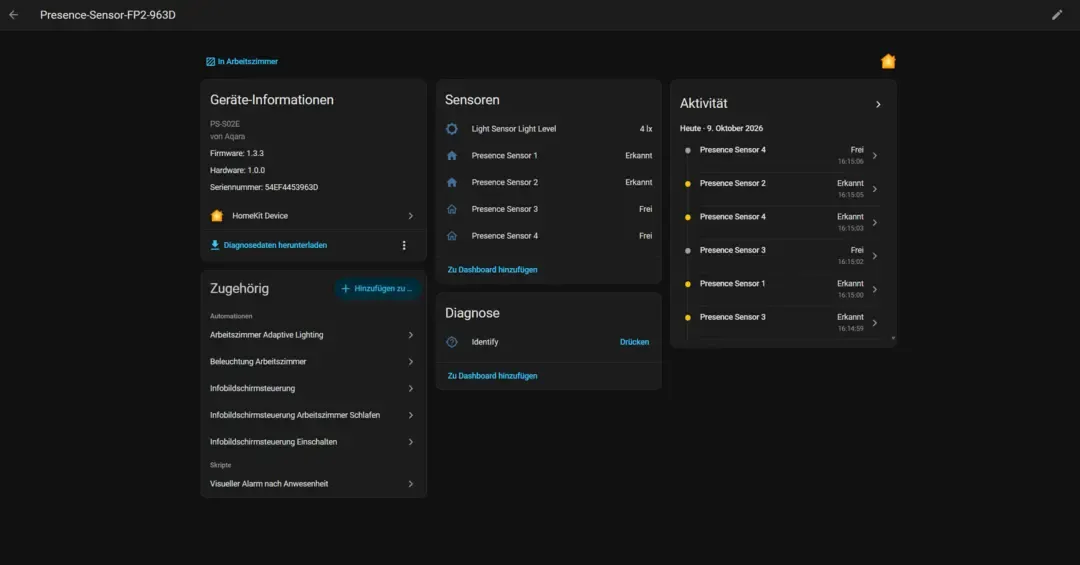
I do not need exact indoor positioning for this. A simple occupied/unoccupied state is enough. I have observed occasional delay after leaving a room, so a speaker there can still announce a message briefly after the room becomes empty. In practice, that has not bothered me. Missing an important notification because no room appeared occupied would be worse, and that has not happened so far.
Coverage is not complete. The bedroom does not yet have a presence sensor, so its speaker announces independently of room occupancy. That is a deliberate exception caused by missing hardware, not a behavior I want to hide behind a generic architecture diagram.
Night mode, priority, and an always-push override
Channel alone is not enough. The script also evaluates priority.
I activate a night mode manually through the bedtime voice routine. Once it is active, normal-priority speech is suppressed. High-priority messages can still be announced, and they play on all configured speakers regardless of room-presence state. That increases the chance that I hear an urgent alert.
A mailbox event is the kind of message I do not want at night. A water-leak sensor is different. The night-mode filter lets me express that distinction centrally instead of repeating time conditions in every caller.
There is also an immer_per_pushnachricht_senden input—literally, “always send by push.” I use it when a notification should leave a history on the phone even if somebody is home. Changes to the alarm-system state are my main example because I want to look back at them and avoid accidentally walking into an armed system.
I use that override sparingly. If every automation enables it, I have merely moved notification overload into the central script rather than solving it.
The complete productive script
This is the complete script from my source article. I anonymized personal information and installation details there before publication. It still contains my German technical identifiers—such as benachrichtigungstext, prioritaet, hoch, and input_boolean.nachtmodus—because changing them would change the interface or logic used by the calling automations.
I translated only reader-facing aliases, field labels, descriptions, and explanatory message text. The block is therefore source-derived and semantically preserved, but it is not byte-for-byte identical to the German configuration.
Before using it, replace the installation-specific persons, entities, speakers, notify actions, device target, and HOME_ASSISTANT_ADRESSE placeholder deliberately. This is my productive configuration, not a universal drop-in blueprint.
alias: Notification
description: ''
mode: queued
fields:
  benachrichtigungstext:
    selector:
      text: null
    name: Notification text
    description: Notification content
    required: true
  an_sprachassistenten_senden:
    selector:
      boolean: {}
    name: Send to voice assistants
    required: true
    default: true
  immer_per_pushnachricht_senden:
    selector:
      boolean: {}
    name: Always send as push notification
    required: true
  an_lametric_senden:
    selector:
      boolean: {}
    name: Send to LaMetric
    default: true
    required: true
  bild_entity:
    selector:
      text: null
    name: Image entity
    required: false
    description: Image entity, for example image.eingang_person
  prioritaet:
    selector:
      select:
        options:
          - normal
          - hoch
        mode: dropdown
    name: Priority
    description: Relevance for voice assistants in night mode
    required: false
    default: normal

sequence:
  - if:
      - condition: or
        conditions:
          - condition: zone
            entity_id: person.lukas
            zone: zone.home
          - condition: zone
            entity_id: person.bewohner_2
            zone: zone.home
      - condition: template
        value_template: '{{ an_sprachassistenten_senden }}'
      - condition: or
        conditions:
          - condition: state
            entity_id: input_boolean.nachtmodus
            state: 'off'
          - condition: template
            value_template: '{{ prioritaet | default(''normal'') == ''hoch'' }}'
      - condition: or
        conditions:
          - condition: or
            conditions:
              - condition: time
                after: '06:00:00'
                before: '22:00:00'
                weekday:
                  - fri
                  - thu
                  - wed
                  - tue
                  - mon
              - condition: time
                after: '09:00:00'
                before: '22:00:00'
                weekday:
                  - sat
                  - sun
          - condition: template
            value_template: '{{ prioritaet | default(''normal'') == ''hoch'' }}'
    then:
      - variables:
          room_routes:
            - occupancy: binary_sensor.arbeitszimmer_belegung
              speaker: media_player.studio_arbeitszimmer
              platform: alexa
            - occupancy: binary_sensor.essbereich_belegung
              speaker: media_player.essbereich
              platform: alexa
            - occupancy: binary_sensor.badezimmer_belegung
              speaker: media_player.badezimmer
              platform: alexa
            - occupancy: binary_sensor.wohnzimmer_belegung
              speaker: media_player.wohnzimmer
              platform: alexa
            - occupancy: binary_sensor.gaeste_wc_belegung
              speaker: media_player.buro
              platform: google

          alexa_targets: >-
            {% set urgent = prioritaet | default('normal') == 'hoch' %}{% set ns
            = namespace(out=[]) %}{% for r in room_routes %}{% if r.platform ==
            'alexa' and (urgent or is_state(r.occupancy, 'on')) %}{% set ns.out
            = ns.out + [r.speaker] %}{% endif %}{% endfor %}{{ ns.out | unique |
            list }}

          google_targets: >-
            {% set urgent = prioritaet | default('normal') == 'hoch' %}{% set ns
            = namespace(out=[]) %}{% for r in room_routes %}{% if r.platform ==
            'google' and (urgent or is_state(r.occupancy, 'on')) %}{% set ns.out
            = ns.out + [r.speaker] %}{% endif %}{% endfor %}{{ ns.out | unique |
            list }}

      - choose:
          - conditions:
              - condition: template
                value_template: '{{ alexa_targets | count > 0 }}'
            sequence:
              - repeat:
                  for_each: '{{ alexa_targets }}'
                  sequence:
                    - action: notify.alexa_media
                      data:
                        message: '{{ benachrichtigungstext }}'
                        data:
                          type: announce
                        target: '{{ repeat.item }}'

      - choose:
          - conditions:
              - condition: template
                value_template: '{{ google_targets | count > 0 }}'
            sequence:
              - repeat:
                  for_each: '{{ google_targets }}'
                  sequence:
                    - action: tts.cloud_say
                      data:
                        entity_id: '{{ repeat.item }}'
                        message: '{{ benachrichtigungstext }}'
                        cache: false

      - action: media_player.play_media
        data:
          announce: true
          media:
            media_content_id: media-source://tts/cloud?message="{{ benachrichtigungstext }}"
            media_content_type: music
            metadata: {}
        target:
          device_id: DEVICE_ID_LAUTSPRECHER

  - if:
      - condition: and
        conditions:
          - condition: or
            conditions:
              - condition: not
                conditions:
                  - condition: zone
                    entity_id: person.lukas
                    zone: zone.home
              - condition: template
                value_template: '{{ immer_per_pushnachricht_senden }}'
          - condition: template
            value_template: >-
              {% set bild = bild_entity | default('') | trim %}{% set picture =
              state_attr(bild, 'entity_picture') | default('') | trim %}{{ bild
              | length == 0 or picture | length == 0 }}
    then:
      - action: notify.mobile_app_lukas_iphone
        metadata: {}
        data:
          title: Smart Home
          message: '{{ benachrichtigungstext }}'
        enabled: false

      - action: notify.mobile_app_lukas_iphone_17
        metadata: {}
        data:
          title: Smart Home
          message: '{{ benachrichtigungstext }}'

  - if:
      - condition: and
        conditions:
          - condition: or
            conditions:
              - condition: not
                conditions:
                  - condition: zone
                    entity_id: person.lukas
                    zone: zone.home
              - condition: template
                value_template: '{{ immer_per_pushnachricht_senden }}'
          - condition: template
            value_template: >-
              {% set bild = bild_entity | default('') | trim %}{% set picture =
              state_attr(bild, 'entity_picture') | default('') | trim %}{{ bild
              | length > 0 and picture | length > 0 }}
    then:
      - action: notify.mobile_app_lukas_iphone
        metadata: {}
        data:
          title: Smart Home
          message: '{{ benachrichtigungstext }}'
          data:
            image: >
              {% set bild = bild_entity | default('') | trim %}{% set image_path
              = state_attr(bild, 'entity_picture') %}
              http://HOME_ASSISTANT_ADRESSE{{ image_path }}
        enabled: false

      - action: notify.mobile_app_lukas_iphone_17
        metadata: {}
        data:
          title: Smart Home
          message: '{{ benachrichtigungstext }}'
          data:
            image: >
              {% set bild = bild_entity | default('') | trim %}{% set image_path
              = state_attr(bild, 'entity_picture') %}
              http://HOME_ASSISTANT_ADRESSE{{ image_path }}

  - if:
      - condition: and
        conditions:
          - condition: or
            conditions:
              - condition: not
                conditions:
                  - condition: zone
                    entity_id: person.bewohner_2
                    zone: zone.home
              - condition: template
                value_template: '{{ immer_per_pushnachricht_senden }}'
          - condition: template
            value_template: >-
              {% set bild = bild_entity | default('') | trim %}{% set picture =
              state_attr(bild, 'entity_picture') | default('') | trim %}{{ bild
              | length == 0 or picture | length == 0 }}
    then:
      - action: notify.mobile_app_bewohner_2_alt
        metadata: {}
        data:
          title: Smart Home
          message: '{{ benachrichtigungstext }}'
        enabled: false

      - action: notify.mobile_app_bewohner_2
        metadata: {}
        data:
          title: Smart Home
          message: '{{ benachrichtigungstext }}'

  - if:
      - condition: and
        conditions:
          - condition: or
            conditions:
              - condition: not
                conditions:
                  - condition: zone
                    entity_id: person.bewohner_2
                    zone: zone.home
              - condition: template
                value_template: '{{ immer_per_pushnachricht_senden }}'
          - condition: template
            value_template: >-
              {% set bild = bild_entity | default('') | trim %}{% set picture =
              state_attr(bild, 'entity_picture') | default('') | trim %}{{ bild
              | length > 0 and picture | length > 0 }}
    then:
      - action: notify.mobile_app_bewohner_2_alt
        metadata: {}
        data:
          title: Smart Home
          message: '{{ benachrichtigungstext }}'
          image: >
            {% set bild = bild_entity | default('') | trim %}{% set image_path =
            state_attr(bild, 'entity_picture') %}
            http://HOME_ASSISTANT_ADRESSE{{ image_path }}
        enabled: false

      - action: notify.mobile_app_bewohner_2
        metadata: {}
        data:
          data:
            image: >
              {% set bild = bild_entity | default('') | trim %}{% set image_path
              = state_attr(bild, 'entity_picture') %}
              http://HOME_ASSISTANT_ADRESSE{{ image_path }}
          message: '{{ benachrichtigungstext }}'
          title: Smart Home

max: 10
The an_lametric_senden field is a technical leftover. An earlier version displayed notifications on my LaMetric; the field no longer has any effect. The fixed speech time windows are another remnant from before night mode became the better control. Disabled old mobile targets show the same history after device changes.
The image-notification branch also reflects my source configuration. It constructs a URL from the image entity’s entity_picture and the HOME_ASSISTANT_ADRESSE placeholder. Current Home Assistant Companion documentation recommends authenticated media_source paths for attachments where possible and documents image-entity proxy paths. Treat the official notification attachment guidance as the current reference before adapting this part to your own network.
A real caller: the washing-machine leak sensor
The water-leak automation shows the interface more clearly than another abstract explanation. It detects moisture and passes the urgent message to script.benachrichtigung. It requests speech, forces a push notification, and assigns high priority so night mode does not silence it.
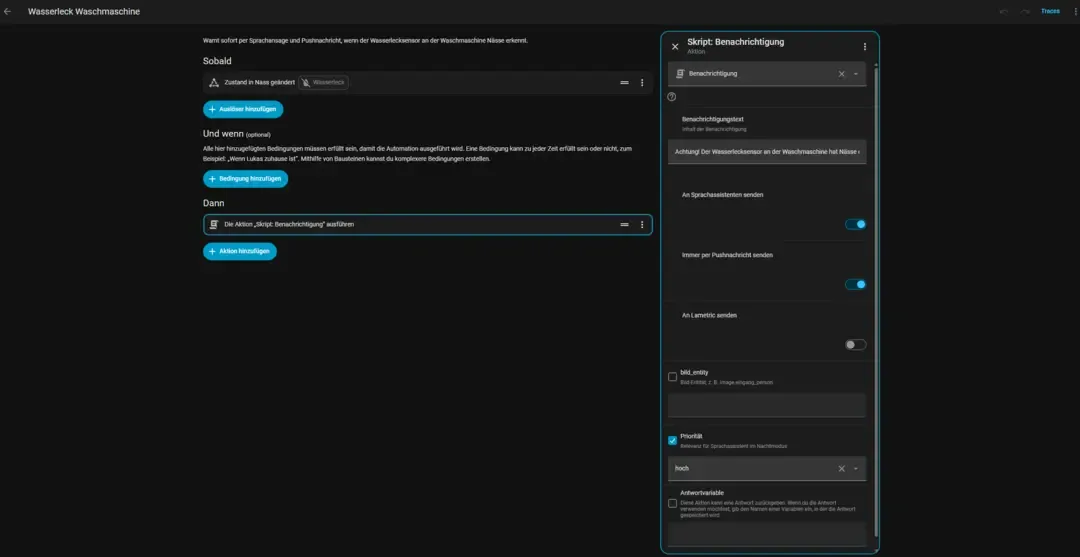
alias: Washing machine water leak
description: >-
  Immediately warns by voice announcement and push notification when the water
  leak sensor at the washing machine detects moisture.
triggers:
  - trigger: state
    entity_id: binary_sensor.waschmaschine_wasserleck
    to: 'on'
conditions: []
actions:
  - action: script.benachrichtigung
    data:
      benachrichtigungstext: >-
        Warning! The water leak sensor at the washing machine has detected
        moisture. Please check immediately.
      an_sprachassistenten_senden: true
      immer_per_pushnachricht_senden: true
      an_lametric_senden: false
      prioritaet: hoch
mode: single
The caller does not name a phone or speaker. It knows the event, message, urgency, and requested behavior. The central script knows the devices.
My productive script is not perfect
I could have cleaned everything before showing it. That would make the YAML look better, but it would also erase part of what several months of real operation produced.
The unused LaMetric parameter should go. The fixed weekday and weekend speech windows should go as well because night mode now represents the household context more accurately. Some disabled notification targets remain from older phones. Several rooms still lack the occupancy hardware that would let the routing design work consistently everywhere.
The missing hardware is especially instructive. I do not buy an attractive device and then search for a purpose. I start with a problem and add hardware when the use case justifies it. Until that happens, the script has explicit exceptions.
There is also a broader design improvement still ahead: callers currently state both relevance and parts of the desired channel. If they supplied only relevance, the central script could choose the channel completely on its own. That is a reasonable next step, but presenting it as already implemented would misrepresent the configuration above.
What several months and 28 automations changed
The strongest proof came when I replaced my smartphone. I did not have to open 28 automations. I changed the notification target in one script, and I even delegated that bounded code edit to AI. I spent more time setting up the phone itself than replacing the relevant Home Assistant entity.
The script also gave me a consistent vocabulary for notifications. Priority is more than a routing flag: choosing it forces me to decide how important an event really is. Presence and room occupancy reduce duplicate or irrelevant delivery. Night mode lets the household stay quiet without weakening genuinely urgent alerts.
I would choose this architecture again despite its technical debt. My central lesson remains simple: an automation should know what event warrants a notification. It should not need to know the device on which that notification will eventually appear.